
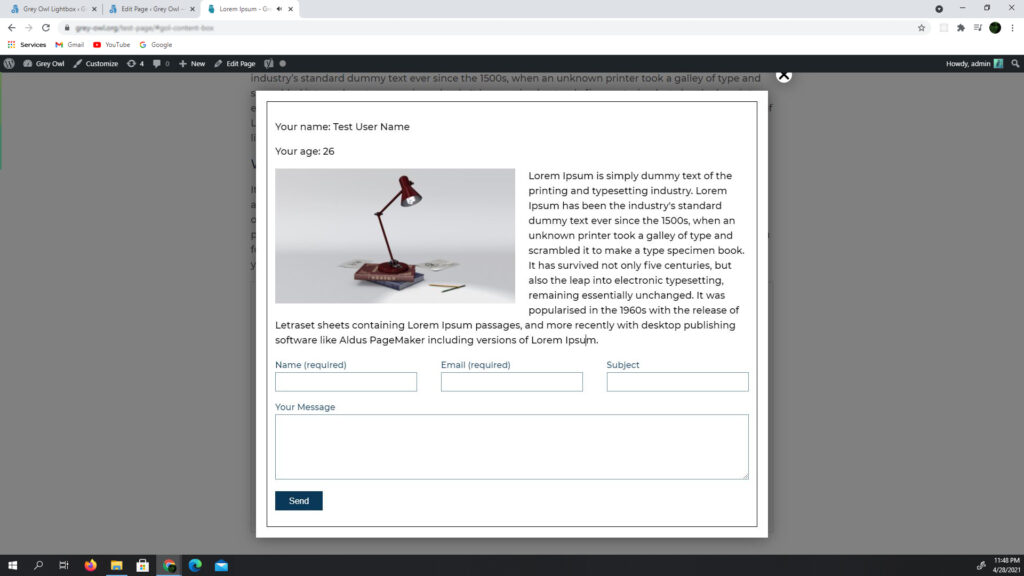
opens HTML elements in a lightbox, making them invisible beforehand, it is also possible to embed dynamic content into HTML
view example videosettings
| dom_html_element | opens html element in lightbox (does not copy javascript events) |
| variables | replaces variables in HTML code ( %1%, %example% ), two constructions can be used: object allows you to use static variables : { var_1 : ‘name’, var_2 : ‘age’ } function allows you to use dynamic variables : function(){ return { var_1 : jQuery(‘input’).val() } } |
| html element attribute [data-gol-content] | hides an html element on the page |
code
<form class="example-form-wrapp">
    <label>
        Your name*
        <input type="text" name="example_your_name" value="">
    </label>
    <label>
        Your age*
        <input type="number" name="example_your_age" value="">
    </label>
    <label>
        Your description*
        <textarea name="example_your_description"></textarea>
    </label>
    <!-- trigger button start -->
    <button class="open-example-lightbox" data-color="#000000">
        open example text color black
    </button>
    <button class="open-example-lightbox" data-color="Brown">
        open example text color Brown
    </button>
    <button class="open-example-lightbox" data-color="#6495ED">
        open example text color cornflower blue
    </button>
    <!-- trigger button end -->
</form>
HTML content to be displayed in lightbox
<div class="html-content-example-box" data-gol-content>
    <div style="color:%color%">
        <p> Your name: %1% </p>
        <p> Your age: %2% </p>
        <p> Your age: %2% </p>
    </div>
</div>
jQuery('.open-example-lightbox').GreyOwlLightbox({
dom_html_element : 'html-content-example-box',
width : 600,
height : 400,
variables : function(){
return {
1 : jQuery('[name="example_your_name"]').val(),
2 : jQuery('[name="example_your_age"]').val(),
var_desc : jQuery('[name="example_your_description"]').val(),
color : jQuery(this).attr('data-color'),
}
}
});example:
for example, enter any data and see how it will be displayed in the lightbox
Your name: %1%
Your age: %2%
Your description:
%var_desc%